When "Standard" OS Upgrades Break AEM: A Deep Dive into Disk I/O Amplification
“If the code hasn’t changed, look at the infrastructure.”
Last week, I spent a few days chasing a performance ghost that appeared immediately after an AEM instance was prepped for a RHEL 7 to RHEL 8 migration on AWS. The symptoms were classic “database” distress, but the root cause was buried in the subtle, silent change of Linux kernel defaults.
The Symptoms: “Commits blocked”
It started with a flood of warnings in the AEM error.log. The repository was essentially gasping for air:
org.apache.jackrabbit.oak.segment.scheduler.LockBasedScheduler Failed to create checkpoint 8056b25c-c782-4d7f-8c2c-f5f8b371c01c in 10 seconds.
org.apache.jackrabbit.oak.segment.scheduler.LockBasedScheduler This commit is blocked by a commit that is in progress since 101484 ms.
On the surface, it looked like a repository corruption or a massive unindexed query. But the Dynatrace metrics told a more physical story.
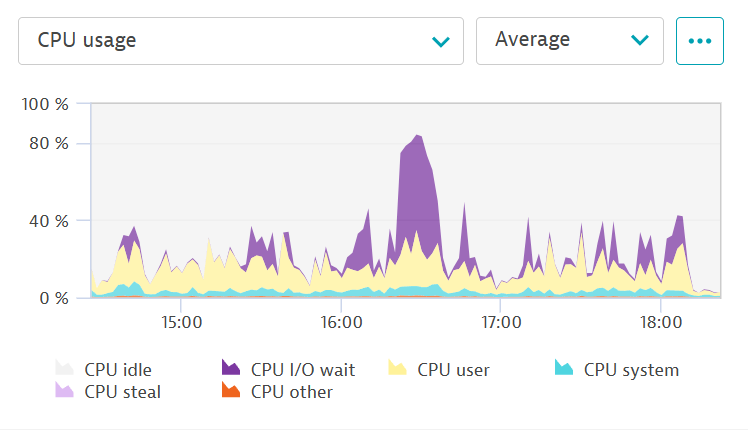
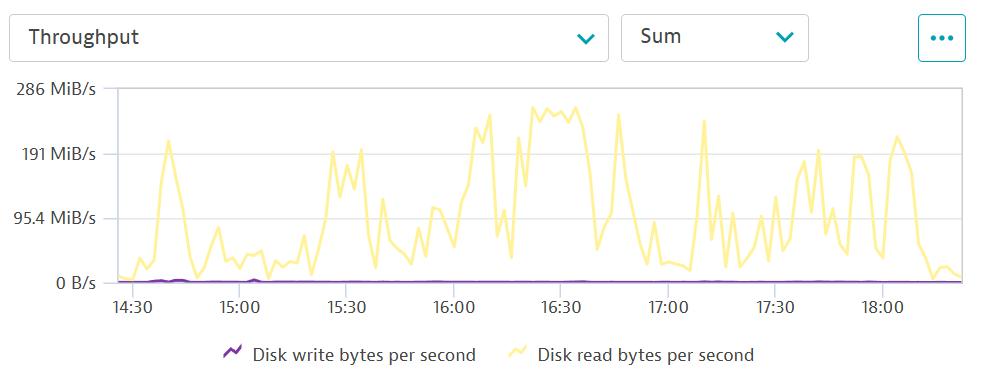
Our CPU wasn’t busy calculating; it was busy waiting. We saw a sustained disk read rate of 200MB/s to 250MB/s, which flatlined perfectly. This “plateau” is a smoking gun—it means the application wants more, but the hardware (or the cloud provider) has hit a hard ceiling.
The Investigation: The Throughput vs. IOPS Paradox
When looking at AWS EBS performance, you have three main constraints: IOPS (number of operations), Throughput (amount of data) and Latency.
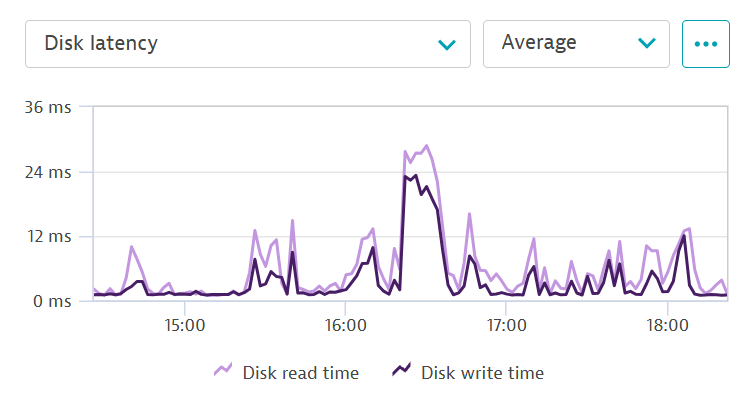
In this case, our IOPS were healthy (around 1k), but our Throughput was pinned. Furthermore, we noticed a massive degradation in responsiveness: our disk read latency had spiked to an average of 3ms, a 500% increase from the healthy 600µs baseline we saw before the issue began.
Why would an AEM instance that used to be quiet suddenly start demanding 250MB of data every single second—and taking 5 times longer to read it—just to perform basic commits?
We checked the usual suspects:
- Revision Cleanup? No, it wasn’t running.
- New Deployment? None in the last month.
- Unindexed Queries? Logs were clean of traversal warnings.
The issue started exactly after a server restart associated with RHEL 8 preparation. That shifted our focus from what AEM was doing to how the OS was talking to the disk.
The Issue #1: read_ahead_kb
In RHEL 7, the default read_ahead_kb (the amount of data the OS fetches in advance during a read) was typically 128KB or 256KB.
In RHEL 8, especially on Nitro-based AWS instances, this default often jumps to 4096KB (4MB) (The default value seems to be depended on the disk’s type).
$ cat /sys/block/nvme2n1/queue/read_ahead_kb
4096
The Math of Failure:
AEM’s Oak repository performs many “Random Reads” of small nodes (8KB-16KB).
-
Old Setting: AEM asks for 8KB $\rightarrow$ OS fetches 128KB. (Wasteful, but manageable).
-
RHEL 8 Setting: AEM asks for 8KB $\rightarrow$ OS fetches 4096KB.
We were experiencing I/O Amplification. For every tiny piece of data AEM actually needed, the OS was forcing the EBS volume to move 4MB of data. We were hitting our AWS 250MB/s throughput cap while only actually using a fraction of that for real work, and this also manifested as a jump in disk latency from 600 microseconds to over 3 milliseconds.
The Issue #2: Transparent Huge Pages (THP)
RHEL 8 is aggressive with Transparent Huge Pages. While intended to help performance, for database-like workloads (Java/JCR), it causes “stalls.” The kernel tries to defragment memory pages in the background, pausing application threads to do so.
The Fix: Kernel Tuning for AEM
To resolve this, we had to revert the “helpful” OS defaults back to values suited for a high-performance JCR repository.
1. Tuning Read-Ahead
Adobe actually recommends an aggressive read-ahead of 32KB for TarMK. We used blockdev to set this on the fly:
sudo blockdev --setra 64 /dev/nvme0n1
2. Disabling THP
We disabled the kernel’s memory defragmentation stalls:
cat /sys/kernel/mm/transparent_hugepage/enabled
always madvise [never]
After persisting these settings and performing a final reboot to clear the “I/O debt” (the backlog of junk data in the page cache), the results were immediate.
-
Read Latency: Dropped from 3.5ms back to < 1ms.
-
Throughput: Fell from 250MB/s to a spiky, healthy 30MB/s.
-
Stability: The “commit blocked by commit” warnings vanished.
Key Takeaways for Tech Leads
-
Trust your Latency: A jump from 600µs to 3ms is a 500% degradation. Even if it stays “low” in absolute terms, it’s a massive relative change.
-
Beware of “Upgrades”: OS defaults are often tuned for generic “throughput” (streaming big files) rather than “latency” (database random access).
-
Monitor Your Caps: If your performance graph looks like a flat table-top, you aren’t hitting an application limit; you’re hitting an infrastructure quota.
When moving to RHEL 8 or AWS Nitro instances, don’t just migrate your code—migrate your kernel tuning.
*** Further reading: Adobe’s Official KB on Linux I/O Tuning for AEM