Deep Dive: Apache Sling Model Exporter Internals
Resources
- Apache Sling Models Implementation: https://github.com/apache/sling-org-apache-sling-models-impl
- Apache Sling Models Jackson Exporter: https://github.com/apache/sling-org-apache-sling-models-jacksonexporter
Surface Implementation: The WKND Example
The Sling Model Exporter framework streamlines the process of exporting Sling Resources into JSON format. To illustrate its usage, we will analyze the official WKND reference project.
Consider the following sample page:
http://localhost:4502/editor.html/content/wknd/language-masters/en/magazine/ski-touring.html
This page is defined by the wknd/components/page resource type, which functions as a proxy for the Core WCM Page component: core/wcm/components/page/v3/page.
Furthermore, within the page’s main layout container, there is an Image component. This resource utilizes the wknd/components/image resource type, which serves as a direct proxy for the Core WCM Image component: core/wcm/components/image/v3/image.

The Core WCM Components include built-in support for the Sling Model Exporter. We can observe this implementation by examining the source code for the Page and Image components.
Page Component PageImpl.java
@Model(
    adaptables = SlingHttpServletRequest.class,
    adapters = {Page.class, ContainerExporter.class},
    resourceType = PageImpl.RESOURCE_TYPE
)
@Exporter(name = "jackson", extensions = "json")
public class PageImpl extends com.adobe.cq.wcm.core.components.internal.models.v2.PageImpl implements Page {
Image Component ImageImpl.java
@Model(
    adaptables = SlingHttpServletRequest.class,
    adapters = {Image.class, ComponentExporter.class},
    resourceType = ImageImpl.RESOURCE_TYPE
)
@Exporter(name = "jackson", extensions = "json")
public class ImageImpl extends com.adobe.cq.wcm.core.components.internal.models.v2.ImageImpl implements Image {
Key Observations:
@Model: This annotation designates the class as a Sling Model. It binds the class to a specificresourceType, enabling the Sling adapter framework to adapt matching resources or requests to this implementation.@Exporter: This annotation instructs the Sling Model Exporter to enable serialization for this model. Specifically, it registers the model to be exported using thejacksonexporter with thejsonextension.
To execute the export, we request the page resource using the model selector and the json extension:
http://localhost:4502/content/wknd/language-masters/en/magazine/ski-touring.model.json
(Note: We will investigate the origin of the default model selector in the next section.)
JSON Output Analysis
The response begins with the page root properties:
{
    "id": "page-70c9d14ac2",
    "designPath": "/libs/settings/wcm/designs/default",
    "title": "Ski Touring",
    "description": "Learn about our ski touring experience...",
    "templateName": "article-page-template",
    "language": "en",
    ":type": "wknd/components/page",
    ":items": {
        "root": {
        ...
Further down, within the container holding the image:
{
    "image": {
        "id": "image-05bfff2b68",
        "src": "/content/wknd/language-masters/en/magazine/ski-touring/_jcr_content/root/container/image.coreimg.jpeg/...",
        "sizes": "",
        "lazyEnabled": true,
        "srcset": "/content/wknd/.../image.coreimg.60.100.jpeg/1707232077006/skitouring1sjoeberg.jpeg 100w, ...",
        ":type": "wknd/components/image",
        "dataLayer": {
            ...
        }
    }
}
Computed Properties & Jackson Serialization
While properties like id and title are direct exports of JCR values, others, such as srcset, require calculation. This logic resides in the Sling Model implementation.
In ImageImpl.java, we find the corresponding getter:
public String getSrcset() {
    // ... calculation logic ...
}
How it works:
Because the model is annotated with @Exporter(name = "jackson"), the Sling Exporter delegates serialization to the Jackson library. By default, Jackson invokes all public getters to generate JSON properties.
Developers can further control this behavior using standard annotations:
@JsonProperty/@JsonGetter: Force the export of a specific field or method.@JsonIgnore: Exclude a getter from the export.
For more details, refer to the Jackson Annotations Documentation.
With this understanding of the native Sling Model Exporter usage, we can now dig deeper into the internal mechanics.
We Need To Go Deeper: The Internal Mechanics of the Sling Model Exporter
How does the Sling framework know to invoke the exporter when .model.json is requested? The answer lies in the dynamic OSGi service registration handled by org.apache.sling.models.impl.ModelAdapterFactory.
1. The Bundle Listener
This OSGi component initializes a ModelPackageBundleListener during startup. This listener implements the BundleTrackerCustomizer interface, allowing it to inspect bundles as they are added or modified within the OSGi container.
When a bundle is added (triggering the addingBundle event), the listener scans the classes within that bundle specifically looking for the @Exporter annotation:
Exporter exporterAnnotation = implType.getAnnotation(Exporter.class);
if (exporterAnnotation != null) {
    registerExporter(bundle, implType, resourceType, exporterAnnotation, regs, accessor);
}
2. Dynamic Servlet Registration
Upon discovering an annotated class, the listener dynamically creates an instance of org.apache.sling.models.impl.ExportServlet and registers it as an OSGi service.
Crucially, it maps the annotation values to standard Sling Servlet registration properties:
private void registerExporter(Bundle bundle, Class<?> annotatedClass, String resourceType, Exporter exporterAnnotation,
                              List<ServiceRegistration> regs, ExportServlet.ExportedObjectAccessor accessor) {
    if (accessor != null) {
        Map<String, String> baseOptions = getOptions(exporterAnnotation);

        // Instantiate the ExportServlet
        ExportServlet servlet = new ExportServlet(bundle.getBundleContext(), factory, bindingsValuesProvidersByContext,
                scriptEngineFactory, annotatedClass, exporterAnnotation.selector(), exporterAnnotation.name(), accessor, baseOptions);

        // Map Annotation values to OSGi Service Properties
        Dictionary<String, Object> registrationProps = new Hashtable<>();
        registrationProps.put("sling.servlet.resourceTypes", resourceType);
        registrationProps.put("sling.servlet.selectors", exporterAnnotation.selector());
        registrationProps.put("sling.servlet.extensions", exporterAnnotation.extensions());
        registrationProps.put(PROP_EXPORTER_SERVLET_CLASS, annotatedClass.getName());
        registrationProps.put(PROP_EXPORTER_SERVLET_NAME, exporterAnnotation.name());

        log.debug("registering servlet for {}, {}, {}", new Object[]{resourceType, exporterAnnotation.selector(), exporterAnnotation.extensions()});

        ServiceRegistration reg = bundleContext.registerService(Servlet.class.getName(), servlet, registrationProps);
        regs.add(reg);
    }
}
As demonstrated, the framework extracts the selector and extensions directly from the annotation to configure the servlet registration.
You might have noticed that the Core WCM Components’ @Exporter annotation did not explicitly define a selector. Yet, the URL requires .model.json. This occurs because the selector attribute defaults to "model" within the annotation definition:
@Target({ElementType.TYPE})
@Retention(RetentionPolicy.RUNTIME)
public @interface Exporter {
    String name();

    String selector() default "model";

    String[] extensions();

    ExporterOption[] options() default {};
}
Below is an example of what the registered service looks like in the OSGi console:
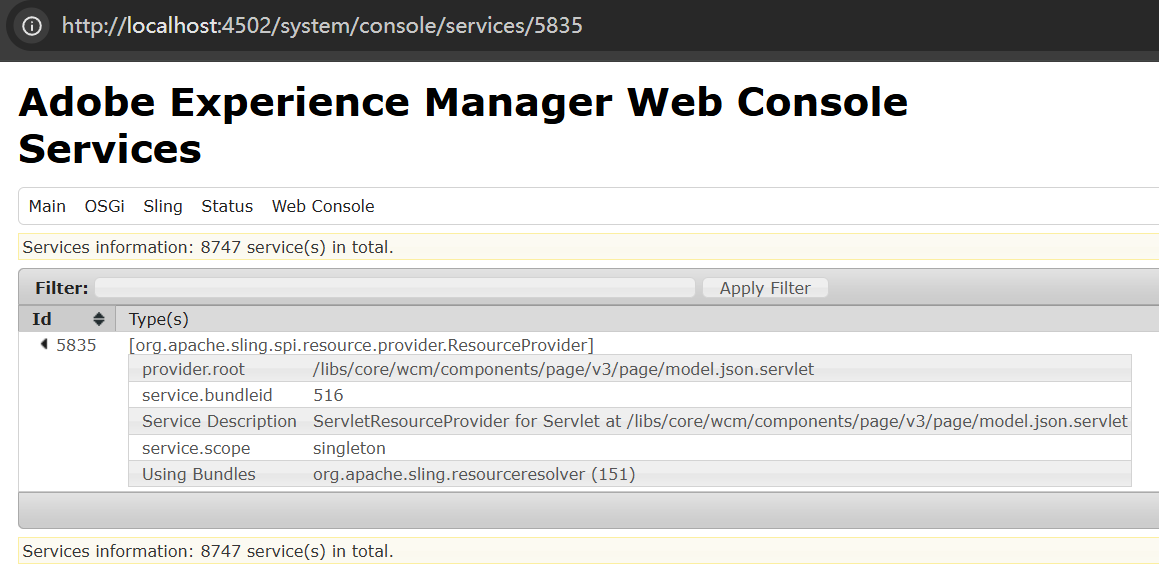
Request Dispatching
When a request such as /content/wknd/.../ski-touring.model.json reaches the Sling Engine, it performs standard servlet resolution:
- ResourceType: Matches the resource’s type (e.g.,
wknd/components/page). - Selector: Matches
model. - Extension: Matches
json.
Since the ExportServlet was dynamically registered with these exact properties, the engine dispatches the request to it.
Inside the ExportServlet
Now, let’s examine the implementation of org.apache.sling.models.impl.ExportServlet.
Class Structure and Key Fields
The ExportServlet maintains several critical references to orchestrate the export process. Here is a breakdown of the most important fields:
// The name of the exporter (e.g., "jackson" for Core WCM models)
private final String exporterName;

// The selector registered to this servlet (defaults to "model")
private final String registeredSelector;

// The bundle context of the bundle that registered the @Exporter service
private final BundleContext bundleContext;

// The Sling Model Factory, used to adapt resources and invoke the export
private final ModelFactory modelFactory;

// Providers for injecting values into Sling Models
private final BindingsValuesProvidersByContext bindingsValuesProvidersByContext;

// Essentially fake ScriptEngineFactory needed for accessing BindingsValuesProviders in the ExportServlet
private final SlingModelsScriptEngineFactory scriptEngineFactory;

// A wrapper that calls modelFactory.createModel() followed by modelFactory.exportModel()
private final ExportedObjectAccessor accessor;

// Base options defined in the @Exporter annotation via ExporterOption[]
private final Map<String, String> baseOptions;
The doGet Execution Flow
When the servlet handles a request, the doGet method orchestrates the serialization pipeline:
@Override
protected void doGet(SlingHttpServletRequest request, SlingHttpServletResponse response)
        throws ServletException, IOException {
    String contentType = request.getResponseContentType();
    response.setContentType(contentType);

    if (APPLICATION_JSON.equals(contentType)) {
        response.setCharacterEncoding(UTF_8);
    }

    // 1. Build configuration map from annotation options, selectors, and request params
    Map<String, String> options = createOptionMap(request);

    ScriptHelper scriptHelper = new ScriptHelper(bundleContext, null, request, response);

    try {
        // 2. Inject script bindings (request, resource, log, etc.)
        addScriptBindings(scriptHelper, request, response);

        String exported;
        try {
            // 3. Perform the actual export
            exported = accessor.getExportedString(request, options, modelFactory, exporterName);
        } catch (ExportException | MissingExporterException e) {
            logger.error("Could not perform export with " + exporterName, e);
            response.setStatus(HttpServletResponse.SC_INTERNAL_SERVER_ERROR);
            return;
        }

        if (exported == null) {
            response.setStatus(HttpServletResponse.SC_NOT_FOUND);
            return;
        }

        // 4. Write the result to the response
        response.getWriter().write(exported);
    } finally {
        scriptHelper.cleanup();
    }
}
Constructing the Options Map
The createOptionMap(request) method aggregates configuration settings into a single map, merging three sources of data:
- Base Options: Defined statically in the
@Exporterannotation. - Selectors: All request selectors are added as keys with the value
"true". - Request Parameters: All query parameters are added as key-value pairs.
This map is passed down to the exporter, allowing dynamic control over the serialization process via the URL.
Script Bindings Injection
The scriptHelper is an instance of SlingScriptHelper, a familiar tool for AEM developers used to retrieve OSGi services within scripts. In the exporter context, this helper is injected into the bindings map under the key "sling".
The addScriptBindings method is critical for setting up the execution environment for the model:
private void addScriptBindings(SlingScriptHelper scriptHelper, SlingHttpServletRequest request, SlingHttpServletResponse response)
        throws IOException {
    SimpleBindings bindings = new SimpleBindings();
    bindings.put("sling", scriptHelper);
    bindings.put("resource", request.getResource());
    bindings.put("resolver", request.getResource().getResourceResolver());
    bindings.put("request", request);
    bindings.put("response", response);
    try {
        bindings.put("reader", request.getReader());
    } catch (Exception e) {
        bindings.put("reader", new BufferedReader(new StringReader("")));
    }
    bindings.put("out", response.getWriter());
    bindings.put("log", logger);

    // Invoke external providers to add more bindings
    scriptEngineFactory.invokeBindingsValuesProviders(bindingsValuesProvidersByContext, bindings);

    SlingBindings slingBindings = new SlingBindings();
    slingBindings.putAll(bindings);

    // Store bindings in the request attributes
    request.setAttribute(SlingBindings.class.getName(), slingBindings);
}
Mechanism Breakdown:
- Standard Objects: It initializes a
SimpleBindingsmap and populates it with standard Sling objects:request,resource,resolver,log, etc. - Extensibility: It invokes
bindingsValuesProvidersByContext. This OSGi component tracksBindingsValuesProviderservices, allowing other bundles to inspect the current bindings and inject additional objects if necessary. - Request Attribute: Finally, the map is wrapped in a
SlingBindingsobject and stored as a request attribute under the keyorg.apache.sling.api.scripting.SlingBindings.
Connection to JSP/HTL
Does this list of objects (request, resource, log) look familiar? It mirrors the implicit objects available in JSP scripts.
Side Quest: If you check /libs/granite/ui/global.jsp, you will see the <sling:defineObjects /> tag. This tag operates similarly by extracting these objects from the bindings and setting them as page attributes, making them directly accessible in your JSP code (via org.apache.sling.scripting.jsp.taglib.DefineObjectsTag).
Usage in Sling Models
In the context of Sling Models, these bindings enable a specific injection strategy using the @ScriptVariable annotation.
@ScriptVariable
private Logger log;
This annotation allows you to inject any object present in the SlingBindings map directly into your model fields, providing a powerful way to access script-level objects without manual lookup.
The Export Execution Chain
Returning to the doGet method, let’s examine the critical line that triggers the actual export:
exported = accessor.getExportedString(request, options, modelFactory, exporterName);The getExportedString method performs two distinct steps:
// 1. Adapt the resource/request to the Model Class (e.g., PageImpl)
Object adapter = modelFactory.createModel(request.getResource(), adapterClass);

// 2. Export the adapted model object
return modelFactory.exportModel(adapter, exporterName, String.class, options);
The ModelAdapterFactory Logic
The exportModel method within ModelAdapterFactory is where the specific exporter implementation is selected. This class acts as an OSGi component that holds references to all registered ModelExporter services.
@Component
public class ModelAdapterFactory implements AdapterFactory, Runnable, ModelFactory, ServletRequestListener {

    // Dynamic reference to all available ModelExporter services
    @Reference(name = "modelExporter", cardinality = ReferenceCardinality.MULTIPLE, policy = ReferencePolicy.DYNAMIC)
    volatile @NotNull Collection<ModelExporter> modelExporters;

    public <T> T exportModel(Object model, String name, Class<T> targetClass, Map<String, String> options)
            throws ExportException, MissingExporterException {

        // Iterate to find the matching exporter (e.g., name == "jackson")
        for (ModelExporter exporter : modelExporters) {
            if (exporter.getName().equals(name) && exporter.isSupported(targetClass)) {
                T resultObject = exporter.export(model, targetClass, options);
                return resultObject;
            }
        }
        throw new MissingExporterException(name, targetClass);
    }
}
In our WKND example, the @Exporter(name = "jackson") annotation ensures that the name parameter passed here is "jackson". The factory iterates through the list until it finds the matching service.
The Jackson Exporter
Out-of-the-box, AEM includes only one ModelExporter service: the JacksonExporter.
Unsurprisingly, its registered name is "jackson". While the implementation of its export() method is verbose, the logic is straightforward:
- Create ObjectMapper: Instantiates a Jackson
ObjectMapper. - Configure Options: Applies the configuration map (merged from the annotation, selectors, and request parameters).
- Serialize: Converts the Sling Model object into a JSON string.
Finally, the ExportServlet takes this resulting JSON string and writes it directly to the response, completing the request lifecycle.
Summary: The Complete Lifecycle
We have traced the path from the initial OSGi bundle startup to the final JSON response. Here is a consolidated view of how the Sling Model Exporter chain operates:
1. Initialization & Registration
- Startup: When the
sling-org-apache-sling-models-implbundle starts, theModelAdapterFactorycomponent is activated. - Listener Creation: It initializes a
ModelPackageBundleListener, which acts as aBundleTrackerCustomizerto monitor OSGi bundle activity. - Scanning: When a bundle (like the Core WCM Components) is added, the listener scans its classes for the
@Exporterannotation. - Dynamic Registration: Upon finding annotated classes (e.g.,
PageImpl,ImageImpl), the listener extracts the configuration (default selectormodel, extensionjson) and dynamically registers a dedicatedExportServletfor that specific resource type.
2. Request Execution
- Dispatch: When a request hits
/content/.../page.model.json, the Sling Engine matches the resource type, selector, and extension to the dynamically registered servlet. - Preparation: The servlet constructs an Exporter Options Map (merging annotation defaults and request parameters) and injects Script Bindings (request, resource, log, etc.).
- Adaptation: It calls the
ModelFactoryto adapt the current request/resource into the target Sling Model class. - Delegation: The factory locates the appropriate
ModelExporterservice (e.g., Jackson) based on the exporter name. - Serialization: The exporter converts the Sling Model Java object into a JSON string.
- Response: Finally, the JSON string is written to the HTTP response.
This architecture provides a highly flexible, annotation-driven system for exposing Sling Resources as structured data, bridging the gap between JCR content and modern frontend applications.